Wire It, Run It, Deploy It: AI Workflows in Gradio
Edit an Image Chain real models into a media studio Fan-out image generation in parallel Profile a Hugging Face dataset Run your own GPU model How it works, in a nutshell Call it from code Build your own Most interesting AI apps are pipelines. You generate an image, then cut out its background if you want to, or edit it into something new.
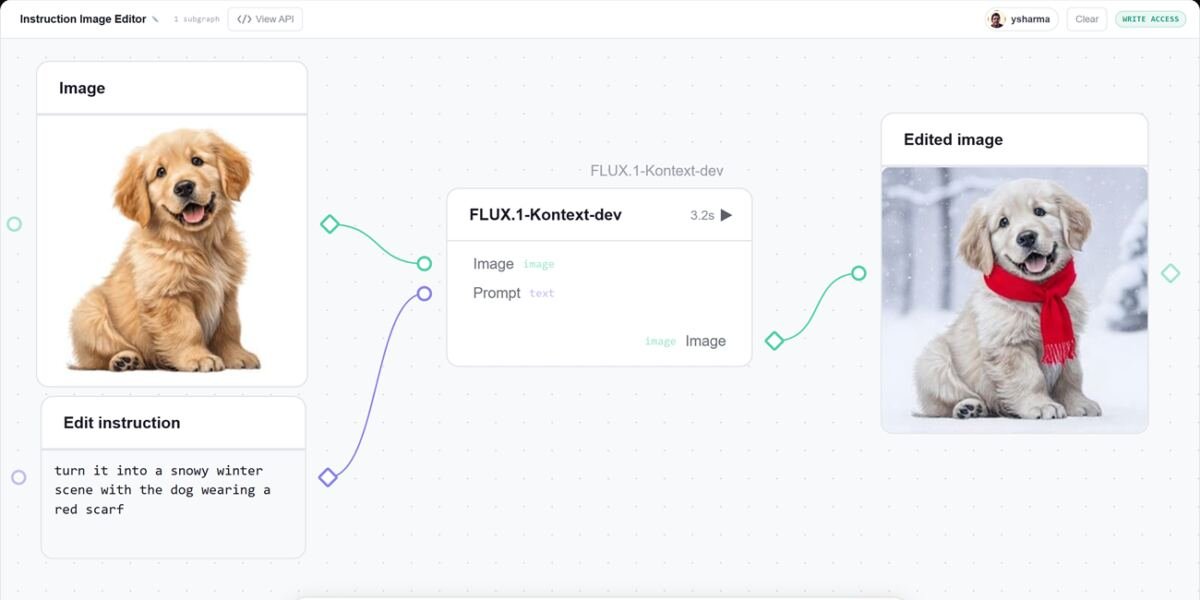
You write a script, then generate a voice for it, or swap the voice while keeping the script the same. We usually wire these steps together in Python, and the moment something looks off we go back to print-debugging to find which step produced the odd value. gr.Workflow, built right into Gradio, makes the pipeline the interface. You describe your steps as a graph of typed nodes, and Gradio serves a drag-and-drop canvas where every node is runnable and every intermediate result is visible. The same graph is also a REST API and a one-command deploy to Hugging Face Spaces. The best way to get the idea is to see a few workflows in action. Every app below is a live Huggingface Space you can open, run, and duplicate. Upload an image, type an edit (“turn it into a snowy winter scene”, “add sunglasses”, “make the car red”), and get the edited photo back. The whole app is a single node calling Qwen-Image-Edit on Hugging Face Inference Providers. One graph, three pipelines. Start with a prompt and generate an image with FLUX, then pass it to a background-removal Gradio Space to turn it into a sticker. A topic becomes a voiceover through a text-to-speech Gradio Space, while the same topic becomes a catchy episode title through an LLM call. That’s one canvas, two model calls through Hugging Face Inference Providers, and two calls to Gradio Spaces. Since this is a workflow, each of the three outputs also gets its own REST endpoint: /sticker, /voiceover, and /episode_title. You can call any of them directly from code without opening the UI.