How we built an internal data analytics agent
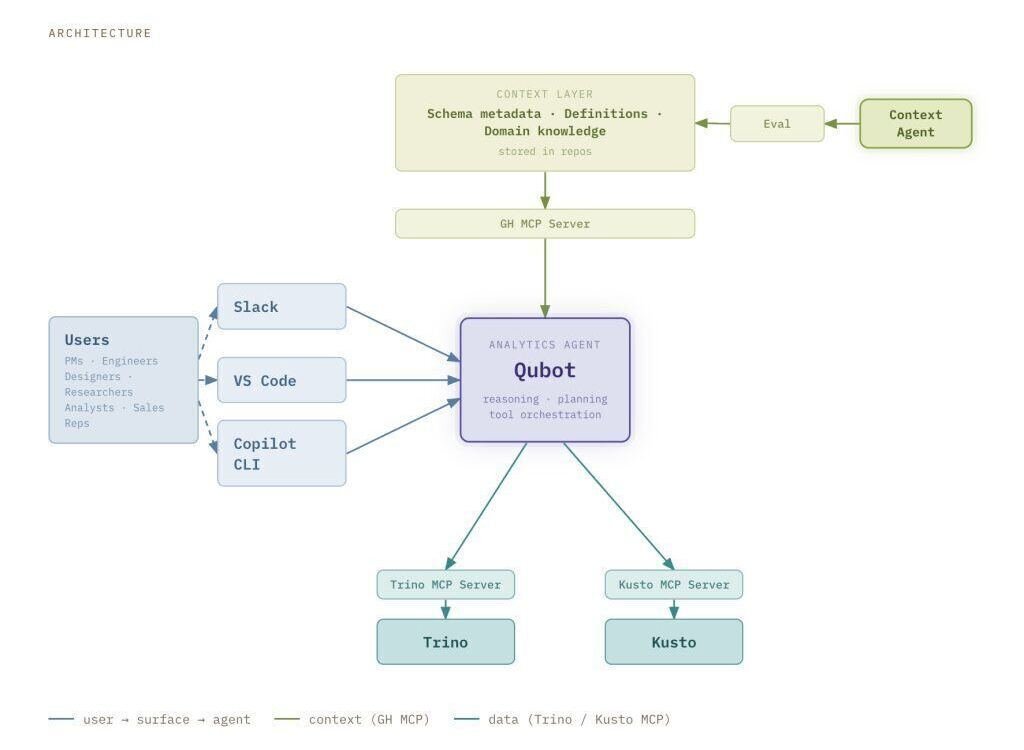
figure — large data and analytics organizations often struggle to make access to data and insights truly self-serve. The industry tried to solve this problem, quite unsuccessfully, for decades, but now AI is giving us a credible way to do just that.
At GitHub scale, providing dedicated analytics support to dozens of product teams is challenging, and therefore many teams are left to solve this problem on their own. Though there is a lot of valuable product telemetry that product and engineering teams can use to make decisions, figuring out which data model, which grain, which filter, and then write the query and validate the result has always been difficult without the support of a data analyst. Enter Qubot, our internal GitHub Copilot-powered analytics agent. Qubot allows any Hubber (that’s what we call GitHub employees) to ask questions about any data model in GitHub’s data warehouse in plain language and get an answer within seconds. Qubot is not a reporting tool or a dashboard replacement. Instead, it’s intended for exploratory questions like “Which cohort of users has the highest retention on this feature?” or “What product contributed to move this metric the most last week?” Qubot has zero cost maintenance and helps teams ramp up quickly on datasets they may be unfamiliar with. In this blog post, we’ll go over how we built Qubot, how it’s changed, and what we learned. How Qubot works The architecture has three main components: user interface, context layer, and query engine. User interface Qubot is accessible through Slack, VS Code, and the Copilot CLI. The Slack interface doesn’t require any configuration, and it is the preferred collaboration tool of Hubbers.