Build a Robot Pick-and-Place Simulation with SimReady Assets
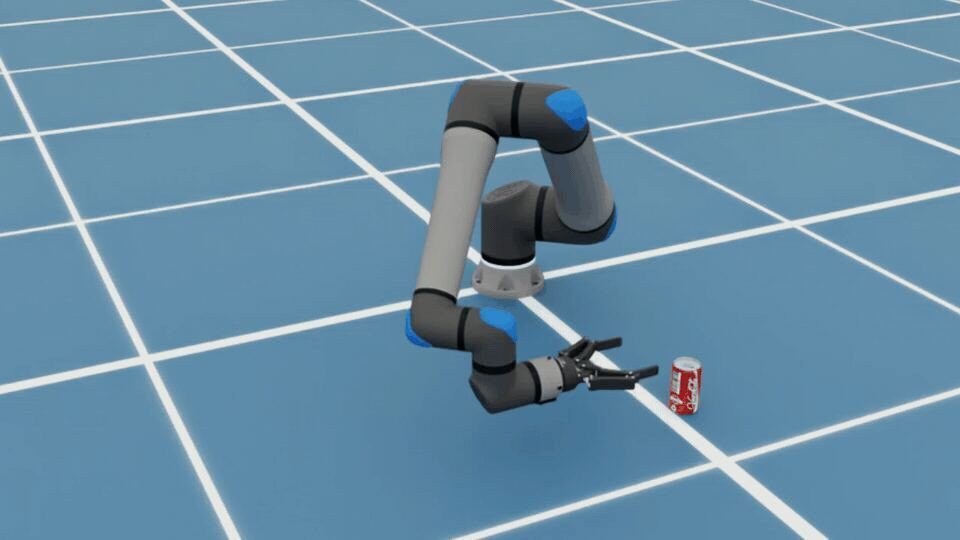
Hugging Face this walkthrough showcases a beverage can pick-and-place task that uses the UR17G arm, Robotiq 2F-140 gripper, and beverage can to compose a scene in Isaac Sim, check their behavior, and run a pick-and-place example with agent-generated controls. For robotics workflows, SimReady means an OpenUSD asset has been prepared with the properties needed for a defined simulation use case, such as collisions, mass, joints, and joint drives.
SimReady Central, an open asset library on Hugging Face, lets you reuse robot and object assets with authored simulation properties and profile-validation evidence. For more about the library and its launch, read the announcement blog. SimReady Foundation defines what features the OpenUSD asset needs for a simulation use case. Its specifications connect three levels: For this task, those properties include the arm and gripper’s joints and a beverage can asset collisions and mass. Validation checks these settings against the profile’s requirements. The simulation then tests whether the assembled robot can use them to pick up and move the can. The UR17G, Robotiq 2F-140, and beverage can packages include the models and their simulation settings. You assemble the scene and add task code to define the arm–gripper assembly, work surface, starting positions, and controls for moving the arm and opening and closing the gripper. Figure 2. SimReady Central supplies the asset models and simulation settings and the example scene and controls define the pick-and-place task. What should you check before running a pick-and-place task? A robot can look visually correct while stationary in Isaac Sim but move or interact with objects incorrectly when the simulation runs. Before running pick-and-place, test its joints, movement, and contact behavior. You can ask the agent to perform these tests or do them manually in Isaac Sim. During pick-and-place, watch whether a beverage can stay in the gripper as the arm moves.